Tampilkan postingan dengan label Digital Camera. Tampilkan semua postingan

Canon EOS-1D X DSLR User Manual Guide

Canon EOS-1D X DSLR User's Manual (Owners Instruction) - The EOS-1D X features Full HD Movie recording. It provides the ability to shoot at 1920x1080p in 24fps, 25fps or 30ps and at 1280x720p in 50fps or 60fps. With either auto or full manual control over both exposure and audio levels it provides both newcomers to video and professionals alike with a powerful tool for shooting movies. The audio levels can be monitored with level meters on the screen during filming and the Silent Control function can be used to adjust the recording level on the fly. You can Downloa Canon EOS-1D X DSLR Operating Instruction Guide / Owner's Manual / User's Manual Download (PDF format) below.
Canon EOS-1D X DSLR
Google Images
To improve the focus tracking of moving subjects, the camera also makes use of the 100,000-pixel RGB exposure sensor. Because the sensor can detect both colors and faces within the scene, it is able to provide this information to the AF microcomputer, thereby tracking subjects by using more than just contrast change information. And the new AI Servo AF III algorithm offers faster, more stable focus tracking.

Canon EOS-1D X DSLR Key Features:
  • 18.1 Megapixel, full-frame CMOS sensor
  • 14-bit A/D conversion
  • Up to 14fps continuous shooting (Super High Speed Mode)
  • ISO range of 100 to 51,200, expandable up to 204,800 and down to 50
  • Dual "DIGIC 5+" processors  for enhanced noise reduction and blazing processing speed
  • 61-point High Density Reticular AF system with up to 41 cross-type points, plus EOS iTR (Intelligent Tracking and Recognition) AF for accurate subject tracking.
  • 100,000-pixel RGB AE sensor with 252 metering zones
  • Zone, Spot and AF Point Expansion focusing modes
  • Dedicated DIGIC 4 processor for exposure metering calculations
  • 1920x1080p full HD EOS Movie with manual exposure control and shooting at 24, 25 and 30 frames per second
  • 1280x720p HD shooting at 50 or 60 frames per second
  • Intra-frame and inter frame compression options for video
  • 100% viewfinder with 0.76x magnification
  • 3.2-inch Clear View II LCD monitor, 170 degree viewing angle, 1,040,000-dot VGA, reflection resistance with multi coating and high-transparency materials for bright and clear viewing
  • Dual CF Card Slots (Compatible with UDMA 7 CF cards)
  • Ergonomically improved controls
  • Magnesium alloy body with shutter durability tested up to 400,000 cycles, exclusive dust-and-weather resistance
  • Ultrasonic Wave Motion Cleaning (UWMC) for improved vibration-based dust removal
  • Built-in RJ-45 Gigabit-Ethernet LAN port
  • Dedicated WFT-E6 WiFi unit
  • Dedicated GP-E1 GPS unit
Download Canon EOS-1D X DSLR Operating Instruction Guide


Sony Alpha SLT-A37 (α37) DSLR User Manual Guide

Sony Alpha SLT-A37 (α37) DSLR Camera User's Manual (Owners Instruction) - SLT-A37 (α37) takes the guesswork out of choosing the right camera settings for virtually any shooting situation. The Superior Auto mode intelligently recognizes a wide range of scenes and subjects, adjusting camera settings for effortlessly accomplished results. You can Download Sony Alpha SLT-A37 (α37) Operating Instruction Guide / Owner's Manual / User's Manual (PDF format) below.
Sony
Google Images
The SLT-A37 (α37) camera helps inexperienced photographers create top-quality portraits with ease. The Auto Portrait Framing mode identifies the subject's position in a composed image and follows the "rule of thirds" to trim the scene and create a beautifully framed portrait. By Pixel Super Resolution Technology ensures that cropped, zoomed portraits retain a full resolution count to flatter the subject.

By Pixel Super Resolution Technology is also used for the "Clear Image Zoom" feature, which digitally doubles the effective magnification of any lens attached to the SLT-A37 (α37), and also maintains superb image detail, tones and textures. Ideal for travel and everyday shooting, it's a great way to boost maximum focal length without carrying extra hardware.

Key Features of Sony Alpha SLT-A37 (α37) A-mount DSLR Camera:
  • 16.1 megapixel Exmor APS HD CMOS sensor
  • ISO100-16000
  • 1440k dot high resolution Tru-Finder (Electronic Viewfinder) with 100% coverage
  • 2.7-inch Tiltable LCD making low/high-angle shootings easier
  • Responsive, accurate 3-cross 15-point phase detection autofocus
  • High-speed shooting up to 7fps
  • Auto Portrait Framing for getting a top-quality portrait
  • Clear Image Zoom doubles effective focal length while maintaining full pixel count
  • Great results made easy with Superior Auto mode
  • Sweep Panorama & 3D Sweep Panorama
  • 11 types (15 variations) Picture Effect modes
  • AVCHD (60i/24p@NTSC, 50i/25p@PAL) ensures smooth, high quality Full HD video


Sony Alpha NEX-F3 User Manual Guide

Sony Alpha NEX-F3 Interchangeable Lens Digital Camera User's Manual (Owners Instruction) - For those new to digital photography, NEX-F3 include the Superior Auto mode, which intelligently recognizes a wide range of scenes and subjects, adjusting settings with the skill of a seasoned photographer. You can Free Download Sony Alpha NEX-F3 Operating Instruction Guide / Owner's Manual / User's Manual (PDF format) below.

The NEX-F3 also includes Auto Portrait Framing feature helps aspiring photographers craft top-quality portraits without effort. This innovative feature identifies the subject subject's position, trimming the scene to create beautifully composed, full resolution portrait photos. Both the original and cropped image files are saved for review.
Sony Alpha NEX-F3
Google Images
Getting close to your subject used to mean packing a more powerful lens, but now you can enjoy high-quality close-ups with Clear Image Zoom that doubles effective magnification of the lens. By Pixel Super Resolution Technology maintains superb image detail, tones and textures. Ideal for travel and everyday shooting, it's a great way to boost maximum focal length without carrying extra hardware.

Key Features of Sony Alpha NEX-F3 E-mount Interchangeable Lens Digital Camera:
  • 16.1 effective megapixels APS-C size Exmor APS HD CMOS image sensor
  • 180° tiltable Xtra Fine LCD Screen
  • Built-in flash, helpful in low-light conditions
  • 5.5 fps Continuous Shooting
  • AVCHD (50i/25p@PAL, 60i/24p@NTSC) ensures smooth, high quality Full HD video
  • Clear Image Zoom doubles effective focal length while maintaining full pixel count
  • Great results made easy with Superior Auto mode
  • Auto Portrait Framing for easy, top-quality portraits
  • 11 (15 variations) Picture Effect modes
  • Face detection
  • Smile shutter
  • Eye-Start AF (with optional FDA-EV1S, LA-EA2 attached)
  • Tracking focus
  • 3D Sweep Panorama
  • Charging via USB or a standard AC outlet
  • Optional FDA-EV1S high-contrast, high-resolution OLED viewfinder


Olympus Tough TG-1 iHS User Manual Guide

Olympus Tough TG-1 iHS Digital Compact Camera User's Manual (Owners Instruction) - The ever popular Magic Filter is included on the TG-1 iHS, with twelve types of filters including newly added Dramatic and Fragmented for shooting still images and movies. You can Free Download Olympus Tough TG-1 iHS Operating Instruction Guide / Owner's Manual / User's Manual (PDF format) below.

In iAuto (Intelligent Auto) mode, the Olympus TG-1 iHS automatically detects the subject, lighting and situation to identify the scene you’re shooting – up to 30 different scenes including Night, Sport, Beach and Snow, Underwater Snapshot and Backlight HDR – and adjusts the settings for ideal results.
Olympus Tough TG-1 iHS
Google Images
Linear PCM Recording, an audio technology pioneered by Olympus for professional voice recorders, records your videos with high-definition audio for optimal playback results.

Shoot like a pro with 10 frames-per-second high-speed burst shooting and 1080p Full HD videos or 60 frames-per-second (3mp) at the touch of button, allowing for slow-motion playback. Thanks to iHS Technology, your videos will benefit from excellent color reproduction and faster processing speeds, while Multi-Motion IS compensates for user movement during recording, creating smoother videos.

Key Features of Olympus Tough TG-1 iHS Digital Compact Camera:
  • 12 Megapixels BSI-CMOS sensor
  • 4x (25-100mm) f/2.0 high-speed wide angle optical zoom lens
  • TruePic VI image processor
  • iHS technology
  • Dual Image Stabilization
  • 3-inch 610,000 dots OLED screen
  • Waterproof to 12m (40 ft) , shock-proof to 2m (6.6 ft), freezeproof to -10°C (14°F), Crushproof to 220lbf (100kgf), Dustproof
  • Built-in GPS & Electronic Compass
  • Manometer
  • Macro LED Light
  • 1080p Full HD Movie Capture and HDMI Control
  • Multi-motion Movie IS
  • Magic Filters
  • Advanced Intelligent Auto Mode (i-Auto)
  • Auto-tracking AF
  • Face Detection and Advanced SAT
  • Low Light Mode
  • Super Sports Mode
  • Super Macro Mode
  • 3D Photo Mode
  • Beauty Mode
  • Pet Detection Mode
  • HDR backlight Adjustment
  • In-Camera Panorama
  • Scene Modes
  • Eye-Fi Card compatibility
  • USB Battery Charging
  • Optional waterproof fisheye converter (FCON-T01), tele converter (TCON-T01)
  • Optional PT-053 Underwater Housing (depth of 45m)
Download Olympus Tough TG-1 iHS Operating Instruction Guide


Samsung NX210 Mirrorless User Manual Guide

Samsung NX210 Mirrorless Interchangeable Lens Digital Camera User's Manual (Owners Instruction) - Take Full Control of Your Pictures with i-Function 2.0, you can adjust key settings using the focus ring right on the lens. Whether you’re a novice or a seasoned pro, you can quickly choose the perfect settings for your shot. You can Free Download Samsung NX210 Operating Instruction Guide / Owner's Manual / User's Manual (PDF format) below.

NX210's Smart Filter 2.0 enables access to 10 filters for applying artistic effects in-camera. Choose the Tilt & Shift Lens Effect for a miniaturized look, the Vignetting Effect for striking contrasts, Half-Tone Dot for a comic-book look, and more. With the Selective Color feature, you can even choose the colors you want to emphasize.
Samsung NX210 Mirrorless
Google Images
The NX210’s panoramic capabilities let you catch every detail on the horizon with the push of a button. You can create 3D images (regular or panoramic) without a special lens and wow your friends by displaying them on a 3D-ready HDTV.

NX210 equipped with a 3.0-inch VGA AMOLED monitor, allowing you to easily review the picture you shot, even in direct sunlight. And because the display utilizes the latest in AMOLED technology, it’s much thinner than a conventional TFT-LCD display, making it much lighter and more compact in size.

Key Features of Samsung NX210 Mirrorless Interchangeable Lens Digital Camera:
  • 20.3 megapixel APS-C CMOS sensor
  • 3.0-inch VGA AMOLED display
  • Built-in Wi-Fi
  • Dual-axis level gauge
  • Optical Image Stabilization
  • 8fps continuous shooting
  • Full HD 1080p Video Capture with Stereo
  • Smart Panel
  • Smart Filter 2.0
  • 2D and 3D Panorama


Casio EXILIM EX-ZR300 User Manual Guide

Casio EXILIM EX-ZR300 Digital Camera User's Manual (Owners Instruction) - EX-ZS300's Art Shot function offers 7 different effects for creating impressively artistic photos, including toy camera, soft focus, light tone, pop art, sepia, black & white and miniature effects. Users can change the processing levels of each effect and color to create artistic photos so good they feel like professional photographers. You can Free Download Casio EXILIM EX-ZR300 Digital Compact Camera Operating Instruction Guide / Owner's Manual / User's Manual (PDF format) below.
Casio EXILIM EX-ZR300
Google Images
The HS Night Shot function merges images taken with high-speed continuous shooting to produce bright, sharply focused shots of scenes that appear dark to the naked eye, without using a flash. HS Night Shot can deliver images with sensitivity up to the equivalent of ISO 12,800, through processing that aligns continuous shooting images, reduces noise and combines the images.

Key Features of Casio EXILIM EX-ZR300:
  • 16.1 megapixel 1/2.3" backlit CMOS sensor
  • 12.5x (24-300mm) Wide-angle Optical Zoom Lens
  • CMOS Shift Stabilization
  • EXILIM ENGINE HS
  • 3.0" 460k dots TFT LCD Monitor
  • 1080p full-HD Video at 30fps
  • Up to 120 fps 640x480 video
  • 0.12s AF Time
  • Premium AUTO PRO
  • HS Night Shot mode
  • Art Shot
  • HDR-ART
  • Support FlashAir wireless SD card
Download Casio EXILIM EX-ZR300 Digital Compact Camera Operating Instruction Guide


Panasonic Lumix DMC-SZ5 User Manual Guide

Panasonic Lumix DMC-SZ5 Digital Compact Camera User's Manual (Owners Instruction) - The SZ5 also features special effects to enhance the shooting experience and create fun photo options. In Miniature Effect mode, the peripherals are defocused while saturation and contrast is emphasized to make the picture look like a diorama. Video recorded in Miniature Effect mode is played back in 10x fast-forwarding, making it comical and fun to watch. Panorama Shot makes it possible to shoot a horizontal or vertical panoramic image by taking consecutive shots and then overlaying the photos for the effect of a panoramic photo. You can Free Download Panasonic Lumix DMC-SZ5 Operating Instruction Guide / Owner's Manual / User's Manual (PDF format) below.
Panasonic Lumix DMC-SZ5
Google Images
To help ensure the LUMIX DMC-SZ5 is easy to use, it features iA (Intelligent Auto) mode. In iA mode, the camera chooses the best setting based on the shooting environment, leaving you free to compose shots and capture moments in both photo and video recording.

The Auto Image Transfer function automatically transfers images on your DMC-SZ5 camera to a computer or other compliant devices while charging the battery via the wireless access point at home. With DLNA functionality, the LUMIX SZ5 is able to share your images and videos with a variety of compatible devices. You can remotely view images on your Smart VIERA TV, and push images and videos to other devices in your home.

Key Features of Panasonic Lumix DMC-SZ5:
  • 14.1-Megapixel CCD sensor
  • 10x (25-250mm) Ultra Wide-angle LEICA DC Vario-Elmar Optical Zoom Lens
  • MEGA O.I.S. (Optical Image Stabilizer)
  • 3.0-inch 230K-dot Intelligent LCD
  • Built-in Wi-Fi Connectivity
  • Live Control with the Smartphone
  • Auto Image Transfer
  • DLNA function
  • Venus Engine
  • Sonic Speed AF & AF Tracking
  • 1280x720 30p (25p @ PAL) HD Video Recording in MP4 format
  • iA (Intelligent Auto) Mode
  • Creative Effects
  • Miniature Effect Mode
  • Panorama Shot
  • Auto Retouch
  • USB Power Charging
Download Panasonic Lumix DMC-SZ5 Operating Instruction Guide


Panasonic Lumix DMC-LZ20 User Manual Guide

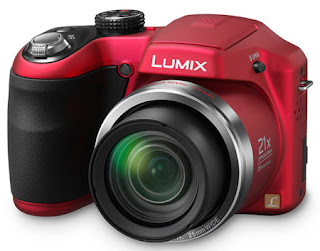
Panasonic Lumix DMC-LZ20 Digital Compact Camera User's Manual (Owners Instruction) - Manual operation is available for LZ20 users with P and M modes expanding the photographic experience and for those who enjoy more creative photography, the DMC-LZ20 can produce a dynamic panorama image in camera by overlaying consequent pictures shot horizontally / vertically with Panorama Shot function. You can Free Download Panasonic Lumix DMC-LZ20 Operating Instruction Guide / Owner's Manual / User's Manual (PDF format) below.
Panasonic Lumix DMC-LZ20
Google Images
Face Detection sets appropriate AF/AE on the face of people in an image while removing the unwanted red-eye. Intelligent Exposure corrects the brightness in parts of the image that are too dark due to insufficient lighting, backlighting or use of the flash. Finally, Intelligent Scene Selector automatically selects one of six Scene modes - Macro, Portrait, Scenery, Night Portrait, Night Scenery and Sunset - that best suits the shooting situation.

For beginners, LUMIX DMC-LZ20 is equipped with iA (Intelligent Auto) mode powerfully assists in any shooting situation to get the best result and reduce mistakes. A comprehensive integration of Optical Image Stabilizer, Face Detection, Intelligent Scene Selector and Intelligent Exposure, iA mode lets the camera do all the work so users are free to compose shots, aim and capture the subject.

Key Features of Panasonic Lumix DMC-LZ20:
  • 16 Megapixel CCD Sensor
  • 21x (25-525mm) Ultra Wide-Angle Optical Zoom Lens
  • POWER O.I.S. (Optical Image Stabilizer)
  • 48.5x Extra Optical Zoom
  • 3.0-inch 460k-dot LCD screen
  • ISO 100-6400
  • 1280x720 / 30p (25p @PAL) HD Video Recording
  • iA (Intelligent Auto) Mode
Download Panasonic Lumix DMC-LZ20 Operating Instruction Guide


Sigma DP2 Merrill User Manual Guide

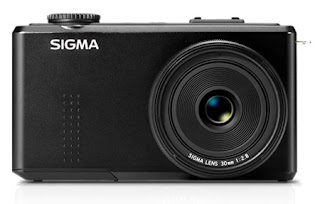
Sigma DP2 Merrill Compact Digital Camera User's Manual (Owners Instruction) - DP2 Merrill features a "9 point select mode" which can select the desired focusing point from 9 different frames and "Free move mode" which can move the desired point as you like. In addition, it is possible to select the size of the focus frame from three types: Spot, Regular and Large. The new AF+MF mode adjusts the focus manually after verifying the AF by rotating the focus ring. You can Free Download Sigma DP2 Merrill (DP2m) Operating Instruction Guide / Owner's Manual / User's Manual (PDF format) below.
Sigma DP2 Merrill
Google Images
Manual Focus is available for use when autofocus or focus lock is not desired. It is possible to use the focus ring for focusing just like an SLR camera. It is also possible to magnify the display to ensure precise focusing.

An advanced user interface is complete with a custom Quick Set (QS) menu and the metallic command dial to improve usability. The diaphragm, shutter speed and menu can be changed quickly using the command dial. The QS menu consists of the most commonly used functions and can be easily displayed by pressing the QS button, allowing photographers to change the menu content and the order depending on preferences.

Key Features of Sigma DP2 Merrill (DP2m):
  • 46 Megapixel Foveon X3 Direct Image sensor
  • Dual three-layer responsive ultimate (TRUE II) engine
  • 30mm (45mm equivalent) f/2.8 Lens
  • 3.0" 920k-dots LCD monitor
  • Manual Focus
  • Records JPEG & RAW Files
  • Built-in Hot Shoe
Download Sigma DP2 Merrill (DP2m) Operating Instruction Guide


Sony Cyber-shot DSC-WX170 User Manual Guide

Sony Cyber-shot DSC-WX170 Compact Digital Camera User's Manual (Owners Instruction) - Express your imagination freely with DSC-WX170 camera's 9 new Picture Effect - Miniature, Pop Color, Soft High-Key, HDR Painting, Partial Color, Toy Camera, Rich-tone Monochrome, Watercolor and Illustration. So no matter what your style is, you will be able to express who you truly are. You can Free Download Sony Cyber-shot DSC-WX170 Operating Instruction Guide / Owner's Manual / User's Manual (PDF format) below.
Sony Cyber-shot DSC-WX170
Google Images
WX170's Superior Auto mode recognizes up to 33 patterns of scenes and automatically selects the optimal shooting mode. Along with 'Tracking Focus' function your subject is always kept in focus, and the enhanced 'HDR mode' recognizes backlit conditions. Giving you the best results, every time.

The WX170 comes with a 3-inch high-resolution 921k-dot wide LCD touchscreen panel with Touch AF, through which users can easily pinpoint their desired focus point with a tap of a finger. Navigate easily with a simple touch on the touch panel by swiping on the display to scroll through your images.

Key Features of Sony Cyber-shot DSC-WX170:
  • 18.2 megapixels Back-illuminated Exmor R CMOS sensor
  • 10x (25-250mm) Wide Angle optical zoom G lens
  • 20x Clear Image zoom
  • Optical SteadyShot Image stabilization with active mode
  • High-speed Auto Focus
  • 3-inch, 921k-dot touchscreen wide LCD display
  • Lightning-fast AF speed of approximately 0.13 second in daylight, 0.20 seconds in low-light
  • 1920x1080/60i (50i@PAL) Full HD recording
  • Touch AF
  • Continuous shooting up to 10fps
  • Self Portrait Timer
  • Superior Auto Mode
  • Intelligent Sweep Panorama
  • 3D Sweep Panorama
  • In-camera retouching
  • 9 Picture Effect modes
  • Guide in camera
  • Date stamp function
Download Sony Cyber-shot DSC-WX170 Operating Instruction Guide


Casio EXILIM EX-N20 User Manual Guide

Casio EXILIM EX-N20 Digital Camera User's Manual (Owners Instruction) - EXILIM EX-N20 is equipped with the Make-up Mode function for especially appealing portrait photographs. The camera automatically detects the subject's face and makes the skin on faces appear smoother and softens facial shadows caused by strong sunlight or illumination. You can Free Download Casio EXILIM EX-N20 Digital Compact Camera Operating Instruction Guide / Owner's Manual / User's Manual (PDF Format) below.

The Anti Shake Mode combined higher sensitivity and faster shutter speeds reduce the chance of image blur due to hand and subject movement, making it possible to capture clear images without using the flash.
Casio EXILIM EX-N20
Google Images
With EX-N20's Best Shot mode, simply select a sample scene from the menu of images that appears on the screen and the camera sets up automatically for the type of image you selected.

EXILIM EX-N20 features Premium AUTO mode which automatically analyzes the scene and applies ideal settings and image processes.The result is perfect photos every time.

EX-N20 equipped with a wide-angle 5x (26-130mm) lens provides plenty of coverage for large groups and scenery shots, which is great at parties and when traveling. The high resolution 16 Megapixel CCD sensor can shoot detailed images and record crisp 1280×720 HD movies.

Key Features of Casio EXILIM EX-N20:
  • 16.1 Megapixel CCD sensor
  • 5x Wide-Angle (26-130mm) Optical zoom lens
  • HD Movie recording
  • 2.7-inch LCD screen
  • Anti Shake mode
  • One-touch operation buttons
  • 26 Best Shot Scenes
  • Make-up function
  • Self-portrait
  • Premium Auto
  • USB camera charging
  • Eye-Fi card compatible
Download Casio EXILIM EX-N20 Digital Compact Camera Operating Instruction Guide


Casio EXILIM EX-N10 User Manual Guide

Casio EXILIM EX-N10 Digital Camera User's Manual (Owners Instruction) - EXILIM EX-N10 features Premium AUTO mode which automatically analyzes the scene and applies best settings and image processes.The result is perfect photos every time. You can Free Download Casio EXILIM EX-N10 Digital Compact Camera Operating Instruction Guide / Owner's Manual / User's Manual (PDF Format) below.

EX-N10 is equipped with the useful Make-up Mode function for beautiful portrait photos. The outstanding image processing makes the skin on faces appear smoother and softens facial shadows caused by strong sunlight or illumination.
Casio EXILIM EX-N10
Google Images
The Anti Shake Mode combined higher sensitivity and faster shutter speeds reduce the chance of image blur due to hand and subject movement, making it possible to capture clear images without using the flash.

With EX-N10's Best Shot mode, simply select a sample scene from the menu of images that appears on the screen and the camera sets up automatically for the type of image you selected.

EX-N10 equipped with a high resolution 16 Megapixel CCD sensor can shoot detailed photos and record crisp 1280×720 HD videos. The wide-angle 5x (26-130mm) lens provides plenty of coverage for large groups and scenery shots, which is great at parties and when traveling.

Key Features of Casio EXILIM EX-N10:
  • 16.1 Megapixel CCD sensor
  • 5x Wide-Angle (26-130mm) Optical zoom lens
  • HD Movie recording
  • 2.7-inch LCD screen
  • Anti Shake mode
  • One-touch operation buttons
  • 26 Best Shot Scenes
  • Make-up function
  • Self-portrait
  • Premium Auto
  • USB camera charging
  • Eye-Fi card compatible
Download Casio EXILIM EX-N10 Digital Compact Camera Operating Instruction Guide


Casio EXILIM EX-N1 User Manual Guide

Casio EXILIM EX-N1 Digital Camera User's Manual (Owners Instruction) - The Anti Shake Mode combined higher sensitivity and faster shutter speeds reduce the chance of image blur due to hand and subject movement, making it possible to capture clear images without using the flash. you can Free Download Casio EXILIM EX-N1 Digital Compact Camera Operating Instruction Guide / Owner's Manual / User's Manual (PDF Format) below.

The Make-up Function automatically detects the subject's face and renders her skin bright and smooth.
Casio EXILIM EX-N1
Google Images
With EX-N1's Best Shot mode, simply select a sample scene from the menu of images that appears on the screen and the camera sets up automatically for the type of image you selected.

EXILIM EX-N1 features Premium AUTO mode which automatically analyzes the scene and applies ideal settings and image processes.The result is perfect images every time.

EX-N1 equipped with a 5x (26-130mm) wide-angle lens provides plenty of coverage for large groups and scenery shots, which is great at parties and when traveling. The high resolution 16 Megapixel CCD sensor can capture detailed photos and record crisp 1280×720 HD movies.

Key Features of Casio EXILIM EX-N1:
  • 16.1 Megapixel CCD sensor
  • 5x (26-130mm) Wide-Angle Optical zoom lens
  • HD Movie recording
  • 2.7-inch LCD
  • Premium Auto
  • Anti Shake mode
  • One-touch operation buttons
  • 26 Best Shot Scenes
  • Make-up function
  • Self-portrait
  • USB camera charging
  • Eye-Fi card compatible
Download Casio EXILIM EX-N1 Digital Compact Camera Operating Instruction Guide


Pentax Optio LS465 User Manual Guide

Pentax Optio LS465 Digital Compact Camera User's Manual (Owners Instruction) - Optio LS465 features an easy-to-replace transparent acrylic panel placed on the camera front, user can easily and quickly change it's appearance. Just insert one of 10 dress-up sheets (included) between the panel and the camera body, and fix the panel using a removable lens ring, and the user can give a fresh look to the camera. Since the camera's front panel is made of high-quality aluminum and processed with an elegant hairline finish, the Optio LS465 offers an elegant, refined appearance, even without a dress-up sheet. You can Free Download Pentax Optio LS465 Digital Compact Camera Operating Instruction Guide / Owner's Manual / User's Manual (PDF format) below.
Pentax Optio LS465
Google Images
The LS465 offers a choice of 9 distinctive digital filters, such as Toy Camera (lomo effect) and Retro, for the easy processing of captured images without requiring a computer. For more creative, personalized visual expressions, the user can select the Miniature filter to turn an actual scene into an image full of miniature models, or the HDR filter to add a painting-like finishing touch.

LS465 features the advanced Face Detection AF&AE function, which instantly and accurately detects human faces within the image field, then optimizes focus and exposure settings. It also offers other handy tools designed for the easy capture of beautiful, lively snapshots and portraits, including: the Smile Capture mode, which automatically releases the shutter the moment the camera detects the subject's smile; and the Natural Skin mode, which gives the subject a smooth, healthy skin tone.

Key Features of Pentax Optio LS465:
  • 16 megapixels CCD Sensor
  • 5x (20-140mm) wide angle optical zoom
  • 2.7-inch 16:9 LCD screen
  • 4:3, 16:9 and 1:1 image aspects
  • 720p HD video @30fps
  • User-friendly Auto Picture mode
  • Green mode to automatically optimize all camera settings (exposure, sensitivity, etc.)
  • Automatic face detection with creative tools
  • 14 scene modes
  • 9 digital filters
  • Customizable with interchangeable provided skins
Download Pentax Optio LS465 Digital Compact Camera Operating Instruction Guide


Canon EOS 650D (Rebel T4i) DSLR User Manual Guide

Canon EOS 650D (Rebel T4i) DSLR User's Manual (Owners Instruction) - EOS 650D (Rebel T4i) camera's range of shooting modes also allows you to explore the boundaries of your creativity. Basic+ allows you to go beyond basic automatic settings, with a range of presets you can use to dramatically and instantly alter the mood of a shot. You can Free Download Canon EOS 650D (Rebel T4i) Operating Instruction Guide / Owner's Manual / User's Manual (PDF format) below.

If you simply want to point and shoot, Scene Intelligent Auto mode does the work for you – analyzing the scene and automatically selecting the best settings, so you can take great shots out of the box.
Canon EOS 650D (Rebel T4i) DSLR
Google Images
Canon's fun range of Creative Filters can now be applied to images using the Touch-screen, with new 'Art Bold Effect' and 'Water Painting Effect' offering more ways to apply a creative twist to a shot.

The HDR Backlight Control tackles tricky, brightly-backlit scenes by capturing three different exposures – under, correctly, and over-exposed – and combining them into one HDR image displaying both highlight and shadow detail.

The Handheld Night Scene, meanwhile, makes it easier to capture beautiful low-light evening shots with no tripod, rapidly shooting four different images before combining them into one detailed, blur-free picture.

EOS 650D (Rebel T4i) features two new scene modes: Handheld Night Scene and HDR Backlight Control.

Canon EOS 650D (Rebel T4i) DSLR Key Features:
  • 18 MP APS-C Hybrid CMOS sensor
  • DIGIC 5 image processing engine
  • 5 fps continuous shooting
  • ISO 100-12,800 (extendable to ISO 25,600)
  • All-cross-type 9-point wide-area AF
  • 3-inch 1,040k dot 3:2 Vari-angle Clear View LCD II Touch screen
  • Full-HD movies with manual controls and continuous AF
  • Handheld Night Scene and HDR Backlight Control
  • Creative filters
  • Integrated Speedlite Transmitter
Download Canon EOS 650D (Rebel T4i) Operating Instruction Guide


Samsung NX1000 Mirrorless User Manual Guide

Samsung NX1000 Mirrorless Interchangeable Lens Digital Camera User's Manual (Owners Instruction) - The 10 Smart Filters and added Selective Color function, for example, mean that users can adjust the look and feel of shots as they take them. In addition, NX1000 feature Panorama and 3D Panorama, allowing the whole story to be told in one complete picture. With the Smart Panel, settings and features can be easily accessed and applied, making creative photography easier than ever. You can Free Download Samsung NX1000 Operating Instruction Guide / Owner's Manual / User's Manual (PDF format) below.
Samsung NX1000 Mirrorless
Google Images
NX1000 is built-in Wi-Fi connectivity can connect either via a wireless Internet router or directly to another device. This allows users to email images and share them on Facebook straight from the camera, via an internet hotspot. Alternatively, it allows photographers to browse images from their camera directly on a Wi-Fi-equipped AllShare or DLNA enabled television, or via an Android smartphone using Samsung's 'MobileLink' app. At our meeting in Seoul we asked the assembled executives for their vision of what the company is calling its 'Smart Camera Ecosystem'. The NX1000 equipped wit a Smart Link Hot Key for quick data transfer to a tablet or smartphone.

NX1000 provide 1080p Full HD stereo movie recording and the mirrorless CMOS image sensor offers precise auto focus even while you shoot.

NX1000 camera's ultra-high speed Auto Focus that can rival almost any system camera and is core component of the system. The result is a fast and precise AF System that captures life's fleeting moments. And with a sequential rate of 8fps, capturing fast-moving objects in perfect clarity are no longer a challenge.

Key Features of Samsung NX1000 Mirrorless Interchangeable Lens Digital Camera:
  • 20.3 megapixel APS-C CMOS sensor
  • 3-inch 921k dots LCD display
  • 1920 x 1080 / 30p full HD movie with stereo
  • Optical Image Stabilization
  • Smart Auto 2.0
  • Smart Link Hot Key
  • Built-in Wi-Fi
  • Dual-axis level gauge


Sony Cyber-shot DSC-RX100 User Manual Guide

Sony Cyber-shot DSC-RX100 Compact Digital Camera User's Manual (Owners Instruction) - The RX100 camera offers a generous choice of artistic options to expand shooting possibilities for enthusiasts and novice photographers alike. It includes the option for 6 different creative styles and a variety of popular picture effects including Toy Camera, Partial Color, HDR Painting and several others, most of which can be previewed directly on screen before shooting. You can Free Download Sony Cyber-shot DSC-RX100 Operating Instruction Guide / Owner's Manual / User's Manual (PDF format) below.
Sony Cyber-shot DSC-RX100
Google Images
The DSC-RX100 features Auto Portrait Framing function making it simple to create sharp, perfectly framed portraits. This unique feature automatically detects faces in a scene, crops the picture accordingly creates a tighter, pro-style composition at full resolution. Both the original and cropped photo are saved for review.

Similar to a DSLR-style interface, there's a choice of auto and manual focus modes on Cyber-shot RX100 for even greater control over your image. If you're focusing manually, MF Assist magnifies your image to simplify fine adjustments. There's also a pro-style Peaking function that highlights sharply-focused areas of the image on screen.

Key Features of Sony Cyber-shot DSC-RX100:
  • 20.2 megapixels 13.2 x 8.8mm Exmor CMOS sensor
  • 3.0-inch Xtra Fine 1,229,000 dots LCD display with WhiteMagic
  • 3.6x (28-100mm) F1.8-4.9 Carl Zeiss Vario-Sonnar T* Lens
  • Optical SteadyShot image stabilization with Active Mode
  • ISO 125-6400 (expandable to 25,600)
  • 25-point autofocus system
  • Ultra-Fast 0.13 Sec High-Speed AF
  • MF Assist & Peaking
  • Capture JPEG and/or RAW format for still images
  • Capture still images in any of four aspect ratios - 1:1, 2:3, 4:3, or 16:9
  • Multi-Frame Noise Reduction
  • 10 fps Burst Mode
  • 1920×1080 60p AVCHD full-HD video
  • Digital level gauge
  • P/A/S/M
  • Face Detection & Face Registration
  • iAUTO
  • Superior Auto Mode
  • Intelligent Scene Recognition (iSCN)
  • Auto HDR Mode
  • Sweep Panorama
  • Auto Portrait Framing
  • Creative Style
  • Picture Effect mode
  • Intuitive operation with Control Ring for creative photo shooting


Pentax K-30 DSLR User Manual Guide

Pentax K-30 DSLR User's Manual (Owners Instruction) - K-30 features a Custom Image function, which allows the user to easily and quickly select the desired finishing touch for a particular image. Choose from 11 custom settings including Bleach Bypass that creates a dramatic visual effect similar to that used in motion pictures, and Cross Process to produce fanciful, eye-catching images boasting dramatic colors. The K-30 also offers a choice of 19 creative digital filters including Miniature, which transforms an actual scene into what appears to be an image of miniature models. These filters add distinctive visual effects to captured images producing creative, artistic images without the need for a computer. The user can further expand the creative possibilities by applying multiple filters and processing modes to a single image. You can Free Download Pentax K-30 DSLR Operating Instruction Guide / Owner's Manual / User's Manual (PDF format) below.
Pentax K-30 DSLR
Google Images
K-30 also offers 19 Scene modes — including Night Scene Portrait, Pet and Backlight Silhouette — to simplify the photographing of subjects and scenes too complicated or too demanding for inexperienced digital SLR photographers, by optimizing all camera settings with a simple choice of the corresponding icon on the camera’s LCD monitor.

K-30's traditional shooting modes feature PENTAX Sensitivity Priority (Sv) and Shutter And Aperture Priority (TAv) for outstanding flexibility, while powerful automatic modes like Auto Picture mode, which automatically selects the most appropriate shooting mode for a given subject or scene from Portrait, Landscape, Macro and other distinctive shooting modes. The photographer can concentrate on image composition and shutter opportunity, while leaving all other camera settings to the K-30, including shutter speed, aperture, white balance, saturation, contrast and sharpness.

Key Features of Pentax K-30:
  • 16.3MP APS-C CMOS Sensor
  • weather-resistant, dustproof and coldproof design
  • Shake Reduction mechanism with user-assisting functions
  • Optical finder with nearly 100% field of view
  • Newly developed SAFOX IXi+ AF module for improved autofocus performance
  • 77 segment metering system
  • 6 fps continuous shooting
  • ISO up to 25600
  • 920K dots 3-inch LCD screen
  • Live View focus peaking
  • Full 1080p HD video capture at 30 fps
  • Programmable front and rear e-dials
  • Traditional, Auto Picture and Scene modes
  • In-camera HDR shooting modes
  • Powered by Rechargeable Li-Ion or AA battery s (via optional D-BH109 AA battery holder)


Samsung NX10 Digital Camera Manual User Guide

Samsung NX10 Digital Camera Manual User Guide - Before you Free Download Samsung NX10 Operating Instruction Guide / Owner's Manual / User's Manual (PDF format) below.Samsung Electronics presents a new innovation, the digital camera that claimed as the future of digital cameras, the Samsung NX10. As the next generation DSLR, Samsung offers a digital camera with features like a DSLR, yet compact size, lightweight, and compact.

"Broadly speaking, the Samsung NX-10 is a combination of DSLR and a pocket camera in one device," Welly said Gunawan, Group Head of Marketing Samsung Digital Imaging Samsung Electronics Indonesia (SEIN), on the sidelines of the launch of the Samsung NX10, Friday, May 7, 2010.

"The camera has features of a DSLR, but not heavy, quick, can even record high-definition video (HD)," said Welly.
Google Images
NX10 incorporates autofocus (AF) is fast and accurate, 14.6 MP CMOS sensor and three-inch AMOLED screen that allows consumers to see the picture clearly even under the sun.

"With the AMOLED screen, the NX10 also claimed to have a response rate 10,000 times faster than a normal LCD. Lower energy consumption with a high contrast ratio, which is 10,000:1 and 500:1 (LCD), "said Rusli Febry, Product Manager of Samsung Digital Imaging SEIN, on the same occasion.

Another advantage, continued Febry, lies in the electronic viewfinder. "Unlike regular DSLR, the NX10 through the viewfinder, users can capture (capture) images exactly to what is seen in the viewfinder. Coverage is 100 per cent. If given effect, the viewfinder is also immediately visible results, "he said.

Because intended for two segments, DSLR lovers and amateur users, Samsung pinning manual functions and Smart Auto functions.

It automatically detects the camera to be photographed, and then select the type of shooting that is right for every situation. Smart Range feature allows the user to get the light and dark areas in the frame.

Dimension 12.3 x 8.7 x 3.9 cm and weighs 353 grams body, NX10 lets users take a picture with a wide selection of ISO, ranging from ISO100 to ISO3200. For video, the camera is capable of producing HD video (MP4 and H.264).
Download Samsung NX10 Digital Camera Manual User Guide


Fujifilm XF1 User Manual Guide

Fujifilm XF1 Compact Digital Camera User's Manual (Owners Instruction) - The XF1 features a new "advanced filter" option that lets you enjoy quite different forms of photographic expression. Choose from 11 creative filters; Pop color, Toy camera, Miniature, High-key, Dynamic tone, and six Partial color options (shoot in B&W plus one selective color: Red, Orange, Yellow, Green, Blue, Purple), and preview the effect of any of the filters on the LCD monitor. You can Free Download Fujifilm XF1 Operating Instruction Guide / Owner's Manual / User's Manual (PDF format) below.
Fujifilm XF1
Google Images
Everyone can take full advantage of the superb image taking potential of the XF1 by using Fujifilm's premium EXR Auto mode, the technology automatically optimizes every setting from exposure to white balance, and switches to the ideal sensor mode for the scene and subject (from 103 patterns according to the scene's demands), making extremely high photo quality easy to achieve, with almost any subject, whatever your ability!

A rich assortment of multi-function controls is available to those who prefer to select XF1 camera settings manually. The main command dial gives you easy access to Shutter Speed and Aperture settings, while up to 6 frequently-used settings can be assigned to the E-Fn expanded-function button as desired, allowing the photographer to capture the scene exactly as intended through intuitive operations performed while viewing the LCD monitor.

Key Features of Fujifilm XF1:
  • 12 megapixel 2/3" EXR-CMOS sensor
  • EXR-Auto
  • Manual 4x (25-100mm) optical zoom
  • 8x Intelligent Digital Zoom
  • Optical image stabilization
  • Fast processing and response times
  • Up to 10 fps shooting
  • 3.0-inch 460K dots LCD monitor with tempered glass for scratch protection
  • 1080p Full HD movie recording
  • Electronic Horizon Leveling Gauge
  • P / A / S / M modes
  • RAW+JPEG Mode
  • Artistic effects
  • Film simulation modes
  • Macro focusing down to 3cm
  • Multiple Exposure
  • 360° Motion Panorama
  • 3D Shooting with "Individual Shutter 3D"
Download Fujifilm XF1 Operating Instruction Guide :