Tampilkan postingan dengan label ZTE. Tampilkan semua postingan

ZTE Warp Sequent Manual User Guide

ZTE Warp Sequent Manual User Guide and Operating Instruction - How to Change the System Language?
Solution:
1. Touch the Home Key -> Menu Key -> System settings -> Language & input -> Language.
2. Select the language you need.

Get Notified of Open Networks
1. Touch the Home Key -> Menu Key -> System settings -> Wi-Fi.
2. Slide the Wi-Fi switch to the ONposition.
3. Touch the Menu Key -> Advanced.
4. Tick the Network notification check box.

How to Edit Quick Response to Rejected Callers?
Solution:
1. Touch the Home Key -> Menu Key -> System settings -> Call -> Quick responses.
2. Touch the text message to edit it

How to Protecting Your Phone With Encryption?
Solution:
* Before turning on encryption, prepare as follows:
1. Set a lock screen PIN or password.
2. Charge the battery.
3. Keep the phone connected to the charger.
4. Schedule an hour or more for the encryption process: you must not interrupt it or you will lose some or all of your data.
* When you’re ready to turn on encryption:
1. Touch the Home Key -> Menu Key -> System settings -> Security -> Encrypt phone.
2. Read the information about encryption carefully.

The Encrypt phonebutton is dimmed if your battery’s not charged or your phone’s not plugged in.
If you change your mind about encrypting your phone, touch the Back Key.

WARNING!If you interrupt the encryption process, you will lose data.
3. Touch Encrypt phone.
4. Enter your lock screen PIN or password and touch Next.
5. Touch Encrypt phone again.
ZTE Warp Sequent

This manual is available online and you can download it directly from ZTE official website. ZTE Warp Sequent manual / owner guide comes in 193 pages in PDF file format with 1.82 MB in size. This user guide contains any information and instruction how to operate the ZTE Warp Sequent smartphone properly. The information collected in this process is not associated with a specific personal identity.

To know more about operating instruction and troubleshooting tips of ZTE Warp Sequent, you can download this ZTE Warp Sequent user manual.

Download ZTE Warp Sequent User Manual.PDF (1.82 MB)


Solavei ZTE Origin Manual User Guide

Solavei ZTE Origin Manual User Guide and Operating Instruction - Adding a New GPRS/EDGE/3G Connection:
1. Touch the Home Key -> Application -> Settings -> Wireless & networks -> Mobile networks -> Access Point Names.
2. Touch the Menu Key -> New APN.
3. Touch each item to enter the information you get from your service provider.
4. Touch the Menu Key -> Save to complete.
TIP: To set the APN to default settings, touch the Menu Key -> Reset to default.
Solavei ZTE

Importing/Exporting Contacts (SIM Card):
1. Touch the Menu Key -> Import/Export from the Contacts Screen.
2. Choose Import from SIM card or Export to SIM card. Your phone will automatically display the contacts.
3. Tick the contacts you want to import or export. Or, just touch  the  Menu Key -> Select all.
4. Touch OK.

Removing the Battery, SIM and microSD Card:
1. Make sure that your mobile phone is off.
2. Remove the back cover.
3. Lift the battery up and out.
4. Slide the SIM card out.
5. Slide the microSD card out.

To know more about operating instruction and troubleshooting tips of Solavie ZTE Origin smartphone, you can download this Solavie ZTE Origin user manual below.

Download Solavie ZTE Origin user guide english.PDF (1.36 MB)


ZTE Grand X User Manual Guide

ZTE Grand X User Manual Guide - ZTE Grand X is a dual core processor that uses the latest OS Android Jelly Bean. Smartphone ZTE Grand X (V970), which carries a 4.3-inch qHD IPS display (960x540 pixels) is equipped with a 5MP camera. Some camera features like LED flash, burst shot and panorama also pinned on the new smartphone.
Google Images
Another advantage is, smartphone with a kitchen runway Dual-Core 1GHz processor and graphics power PowerVR SGX 531 GPU supports dual-SIM (GSM) with dual-standby features.

ZTE Grand X has arrived with Jelly Bean. Thus, users no longer have to update manually. With the latest Android operating system, it supports features such as Google Now, Expandable Notifications and Butter Project.
Download ZTE Grand X User Manual Guide


ZTE V889M User Manual Guide

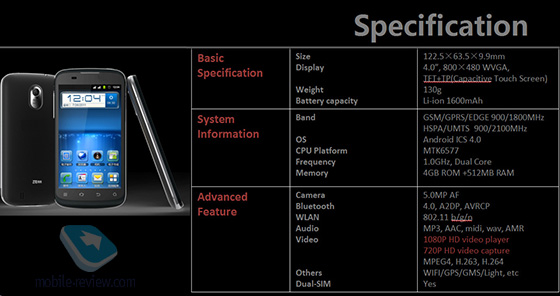
ZTE V889M user manual guide free pdf download instruction book online operating Setting Troubleshooting Support - ZTE V889M is a dual SIM smartphone equipped with a dual-core 1 GHz processor and 4-inch capacitive touchscreen display. Increased capacity in some sectors create more expensive than the type V790.

Not only more extensive, embedded resolution is also much better with 480 x 800 pixels. In addition to the purposes snap the picture, you can enjoy a 5 MP camera with auto focus, LED flash. Record 720p HD video also.
ZTE V889M
ZTE Image
Just like V790 type, this type is supported by the Android ICS. On storage media, ZTE V889M give room for 4 GB and 512 MB ​​RAM. Plus microSD up to 32 GB for free users save games or all sorts of applications. While this has not obtained a quote and availability of two new models.

Specifications ZTE V889M:

Network: GSM 900/1800 - SIM 1 and SIM 2, HSDPA 900/2100; Dimensions: 120.5 x 63.6 x 11.9 mm Screen: TFT, capacitive touchscreen, 480 x 800 pixels, 4 inches; Main camera: 5 MP, 2592? 1944 pixels, autofocus, Geo-tagging, video, Memory: 4 GB storage, 512 MB RAM, microSD up to 32 GB; OS: Android OS, v4.0; Processor: MediaTek MT6577, Dual-core 1 GHz; Transfer data: HSDPA , HSUPA Connectivity: Wi-Fi 802.11 b / g / n, Wi-Fi hotspot, Bluetooth v2.1 with A2DP, microUSB v2.0 other Features: Dual SIM, A-GPS, SNS integration, MP4/H.263 / H.264/WMV player, MP3/eAAC + / WMA / WAV player, Google Search, Maps, Gmail, YouTube, Calendar, Google Talk, Document viewer, Photo viewer / editor, Voice memo / dial; Battery: Li-Ion 1650 mAh;
[ Reguest ZTE V889M User manual Here ]


ZTE V790 User Manual Guide

ZTE V790 user manual guide free pdf download instruction book online operating Setting Troubleshooting Support - ZTE V790 is the latest product based dual SIM card. This smartphone has been injected with Android ICS. As the world's top five handset vendors, ZTE is committed to continuing to make the devices suitable for consumers.

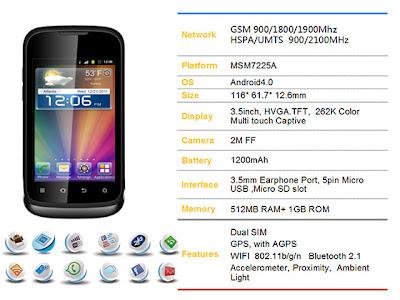
ZTE V790 supports WCDMA and GSM networks, which allows you to combine two cards in one device at a time without the need to carry two devices. Sasar novice users, the screen resolution is fairly ordinary. Limited to 320 x 480 pixels in dimensions of 3.5-inch screen.
ZTE V790
Google Images
Bringing Android ICS capabilities, the processor is Qualcomm Snapdragon 1 GHz accommodation and 3D graphics capabilities. This ensures the phone right now run the games and watching videos. Munitions include 512 MB RAM, 1 GB ROM and a 3.2 MP camera as a tool for photography.

Channel data used are technologically HSDPA and HSUPA. Not to mention the action ante WiFi to browse and explore the virtual world in the area of ​​mobile hotspot.

ZTE V790 Specifications:
Network: GSM 900/1800/1900 - SIM 1 and SIM 2, HSDPA 900/2100; Dimensions: 116 x 61.7 x 12.6 mm Screen: TFT, capacitive touchscreen, 256K colors, 320 x 480 pixels, 3.5 inches; Main camera : 3.15 MP, 2048 × 1536 pixels, geo-tagging, video; Memory: 1 GB storage, 512 MB RAM, microSD up to 32 GB; OS: Android OS, v4.0; Processor: Qualcomm MSM7225A Snapdragon, 1 GHz; Transfer Data : HSDPA, HSUPA Connectivity: Wi-Fi 802.11 b / g / n, Wi-Fi hotspot, Bluetooth v2.1 with A2DP, microUSB v2.0 other Features: Dual SIM, FM radio, A-GPS, SNS integration, MP4/H.263/H.264/WMV player, MP3/eAAC + / WMA / WAV player, Google Search, Maps, Gmail, YouTube, Calendar, Google Talk, Document viewer, Photo viewer / editor, Voice memo / dial; Battery : Li-Ion 1200 mAh;


ZTE Blade III User Manual Guide

ZTE Blade III user manual guide free pdf download instruction book online operating Setting Troubleshooting Support - Android-based smartphones is being more and more popular in the world and able to compete with other smartphones such as iPhone, Blackberry and Nokia Lumia. Some of the things that makes Android popular smartphone adalahharga its mostly pretty affordable and applications contained in Google Play too much good but free. Starting from Samsung, Sony, HTC, Asus, Acer and even ZTE compete to win the hearts of users in the smartphone market.
ZTE Blade III
Google Images
The rise of Android-based smartphones with high hardware specs coupled with affordable price. An example is that ZTE will issue a new Android-based smartphones, ZTE Blade III at the end of September.

For the initial launch itself, ZTE Blade III will be anchored in the Nordic countries such as Finland at the end of September 2012 and to Sweden in October 2012 at a price of around U.S. $ 229. The prices are pretty comparable to the hardware specifications on offer. Here are some of the technical specifications offered by ZTE Blade III:
  1. Qualcomm MSM7227A processor 1 GHz Snapdragon processor and Adreno 200 GPU
  2. TFT capacitive touch screen multi-touch 4 inches 480 x 800
  3. 512 MB of RAM
  4. 4GB of internal storage capacity (2.5 GB usable user) and you can add up to 32 GB microSD
  5. 5 MP rear camera with auto focus and support has features Geo-Tagging
  6. It's operating system Android Ice Cream Sandwich V 4.0.4
  7. Connectivity using NFC, Bluetooth 2.1, Wi-Fi, DLNA and microUSB 2.0
Compared to the version before the ZTE Blade, Blade series has better hardware specs and certainly with the new technology. For the design of the outside of the ZTE Blade III is quite attractive with white and form a fairly wide.

Here you are the User Guide PDF Manual Copy / for ZTE Blade III directly from ZTE official website. ZTE Blade III user guide in English, Download from the Links below
[Download ZTE Blade III User Manual Guide]


ZTE Merit Manual User Guide

ZTE Merit user manual guide free pdf download instruction book online operating Setting Troubleshooting Support - This ZTE Merit user manual is available for FREE at ZTE website, we merely collect the information, we neither affiliated with the author(s), the website and any brand(s) nor responsible for its content and change of content. (Read our disclaimer before you download the document from the website).

How to install the Memory Card?
Solution:
1. Slide the slot protector upward to open it.
2. Insert the memory card into the slot with the gold contacts on the card facing the phone.
3. Close the slot protector and slide it down to lock it in place.
4. Replace the back cover of the phone.

How to Sync the Address Book to Google?
Solution:
Sign in to your Google account on the phone and you will be able to sync address book, calendar events, Gmail, and Picasa™ web album.
1. From the home screen, press Menu and tap Settings -> Accounts & sync.
2. Tap your Google account.
3. Make sure that the check box next to Sync Contactsis checked.
ZTE Merit
Google Images
ZTE Merit manual / user guide is originally available at ZTE official website. We are only taking part in collecting information, and we are not affiliated with the author, website, and any brand. We are also not responsible for the content and its changes. This manual comes in 40 pages of PDF document format (6.95 MB)


To know more about operating instruction and troubleshooting tips of ZTE Merit smartphone, you can download the ZTE Merit user manual below.

Download ZTE Merit User Manual.pdf (6.95 MB)